Assignment 3: React Frontend
Release Date: February 15, 2026
Due Date: March 1, 2026, 11:59 PM EST
Weight: 12.5% of final grade
Overview
Building upon Assignment 2, which established the backend with a PostgreSQL database, this assignment expands the Paper Management System into a full-stack application by adding a React frontend.
You will develop a React + TypeScript user interface for managing papers and authors, allowing users to perform CRUD (Create, Read, Update, Delete) operations through an interactive web application. The frontend communicates with your Assignment 2 backend via REST APIs, fetching and displaying data dynamically.
Learning Objectives
After completing this assignment, you will be able to:
- Build React components using function components and TSX
- Use
useStateanduseEffectfor state and side effects - Integrate a frontend with a REST API
- Implement client-side routing using React Router
- Apply practical TypeScript typing to React applications
- Implement controlled forms with validation
- Handle loading and error states correctly
- Style React components using CSS modules
Requirements
Before you start coding
After reading the assignment requirements below, pause and think about what you expect will be the hardest part of this assignment. This will help you answer Q1 in reasoning.md, which you will submit together with your code.
See the AI Usage Policy for details.
The detailed requirements can be found in the next Detailed Requirements section.
Starter Code
Download the starter code archive:
curl -o starter-code.tar.gz https://www.eecg.utoronto.ca/~cying/courses/ece1724-web/assignments/assignment-3/starter-code.tar.gzAlternatively, download the archive here.
The archive includes:
- Vite + React + TypeScript setup
- Preconfigured proxy for backend API
- Component skeletons with TODO comments
- Sample Playwright tests
- AuthorSelect.tsx
- PaperForm.tsx
- PaperList.tsx
- EditPaper.tsx
- Home.tsx
- global.css
- Home.module.css
- PaperForm.module.css
- PaperList.module.css
- main.tsx
- types.ts
- sample.test.ts
- eslint.config.js
- index.html
- package.json
- tsconfig.app.json
- tsconfig.json
- tsconfig.node.json
- vite.config.ts
You need to:
- Set up React Router in
main.tsx - Implement home page layout in
routes/Home.tsx - Add paper editing functionality in
routes/EditPaper.tsx - Implement paper list display in
components/PaperList.tsx - Create paper creation form in
components/PaperForm.tsx - Implement author selection in
components/AuthorSelect.tsx - Add custom types in
types.ts
Do not modify:
index.html- CSS files in
src/styles/directory - Vite/TypeScript configuration files (e.g.,
vite.config.ts,eslint.config.js,tsconfig*.json)
Paper Management
- Implement a paper list view with loading states
- Create a paper form to add a new paper, allowing selection of existing authors from a dropdown
- Implement paper editing (title, venue, year) but do not allow editing authors for simplicity
- Implement paper deletion with a confirmation prompt
React Implementation
- Use function components and hooks (
useState,useEffect) - Implement React Router for client-side navigation (
Home,EditPaperpages) - Use
fetchfor data fetching - Handle loading and error states properly
Detailed Requirements
You only need to implement what is explicitly required.
Home Route ("/")
Page Layout
Page should display:

- Main heading:
Paper Management System - Section heading:
Create New Paperfollowed by the create paper form - Section heading:
Papersfollowed by the paper list
Paper List Display

- Display all papers in a list format showing:
- Paper title
- Publication venue
- Publication year
- List of author names (comma-separated)
- Each paper should have:
Editbutton to navigate to edit pageDeletebutton to trigger deletion confirmation
- Loading state should show
Loading papers...
- Error state should show
Error loading papers
- Empty state should show
No papers found
Delete Functionality
-
Each paper in the list should have a
Deletebutton
-
Clicking the delete button should show the browser’s built-in confirmation dialog using
confirm():
- Dialog message:
Are you sure you want to delete [paper title]? - The dialog will have default
OK(to confirm deletion) andCancelbuttons
- Dialog message:
-
After user interaction:
-
If
OKis clicked:-
Send delete request to backend
-
Display
Paper deleted successfullyin DOM -
Remove the deleted paper from the list

-
Note: If the last paper is deleted, you may display
No papers found. The autograder checksPaper deleted successfullywhen deleting a paper that is not the only paper in the database.
-
-
If
Cancelis clicked:- Close the dialog and make no changes
-
If deletion fails:
- Display “Error deleting paper” in DOM
-
Create Paper Interface
-
Form fields:
- Title (required, text input)
- Published In (required, text input)
- Year (required, number input)
- Authors (multi-select dropdown for selecting paper authors)
- Show
Error loading authorsabove dropdown if fetch fails - Show
No authors availablein dropdown if author list is empty - Dropdown should be disabled during loading or error states
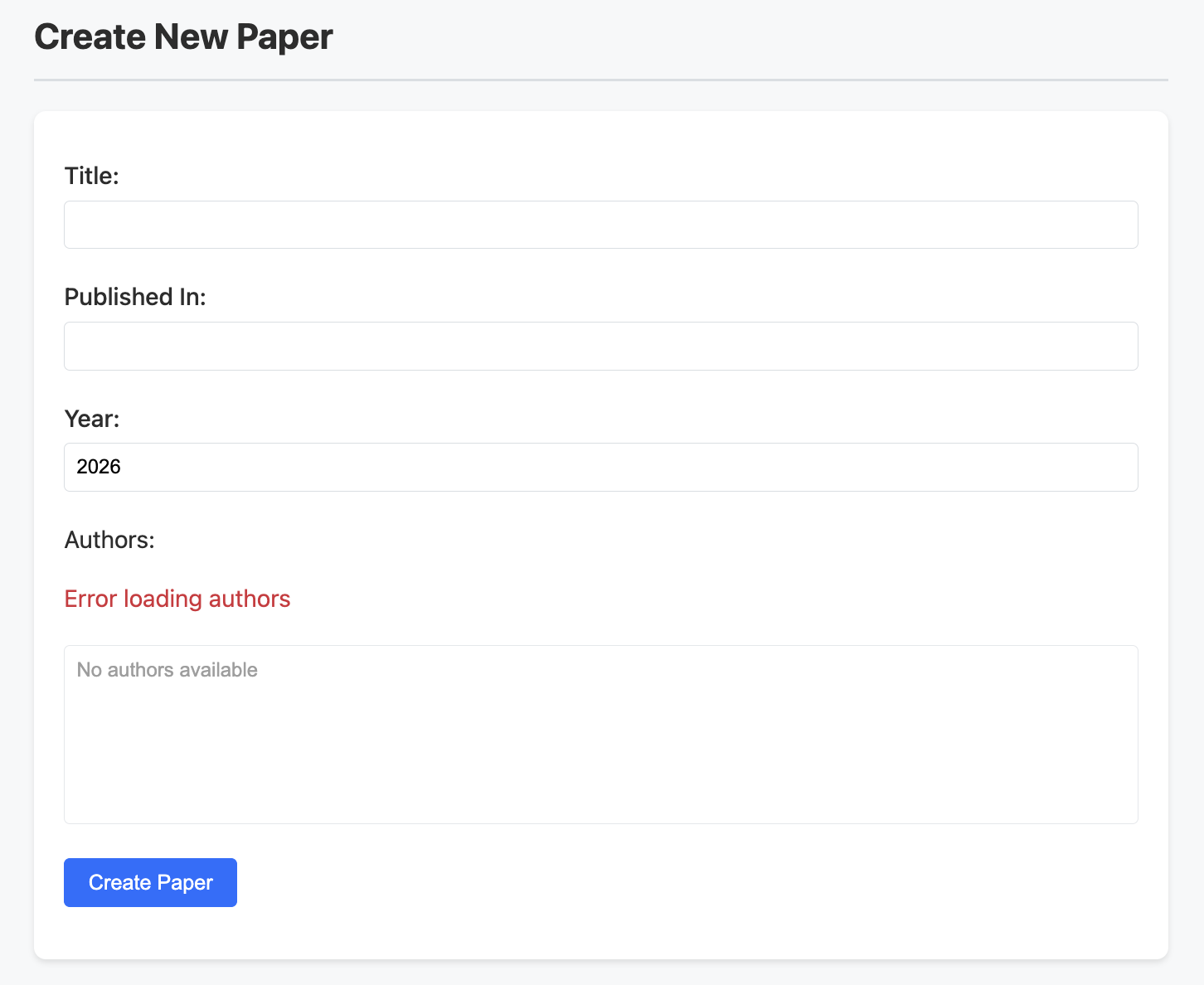
- Note: Use Ctrl+click (Windows/Linux) or Cmd+click (Mac) to select multiple authors
- Show
-
Validation: On submit, validate in this order and display only the first error encountered:
Title is requiredif empty string or string containing only whitespacePublication venue is requiredif empty string or string containing only whitespacePublication year is requiredif emptyValid year after 1900 is requiredif not an integer greater than 1900Please select at least one authorif no authors selected

Note about the Year field
Because the Year field uses
<input type="number">:-
When manually testing
Publication year is required, the browser may immediately display0instead of leaving the field visually empty after you clear the input. This is expected browser behavior for number inputs.For this assignment, the “empty year” case refers to clearing the input and submitting the form. Your validation should treat this situation as empty input and display:
Publication year is required.The provided sample test cases include
"Create Form Validation: 'Publication year is required' if empty", and the autograder checks the same validation logic in Edit mode as well. If your implementation passes the sample test and your Edit page applies the same validation rule, then this message is implemented correctly. -
Non-numeric characters (e.g., letters) cannot be entered in a number input field.
As a result, for the validation rule
Valid year after 1900 is required, the autograder will only test numeric values, including:- positive integers (e.g.,
1800) - fractional decimal values (e.g.,
1901.5)
Decimal values ending with
.0(e.g.,1901.0) are acceptable, since they represent an integer year. The autograder will not test decimal values ending with.0. - positive integers (e.g.,
-
Submit behavior:
-
Submit button should be labeled
Create Paper -
On success:
-
Show
Paper created successfullyin DOM
-
Delay any page reload by 3 seconds
-
No need to refresh the paper list before the reload
-
-
On failure
- Show
Error creating paperin DOM
- Show
-
Edit Route ("/edit/:id")
Page Layout
Page should display:

- Main heading:
Edit Paper - Edit form below the heading
Paper Edit Interface
-
Form pre-populated with existing paper data with fields:
- Title (required, text input)
- Published In (required, text input)
- Year (required, number input)
-
Authors are displayed but can not be edited (for simplicity)
- The author dropdown is still rendered and selectable.
- However, changing the selected authors will not modify the paper’s authors in the database.
- When submitting an update request, you must preserve the original authors fetched from the backend and include them unchanged in the
PUT /api/papers/:idrequest.
-
Validation: On submit, validate in this order and display only the first error encountered:
Title is requiredif empty string or string containing only whitespacePublication venue is requiredif empty string or string containing only whitespacePublication year is requiredif emptyValid year after 1900 is requiredif not an integer greater than 1900

-
State messages:
- Loading state: Show
Loading paper details... - Error state: Show
Error loading paper - Not found state: Show
Paper not found
- Loading state: Show
-
After submission:
- On success:
- Render
Paper updated successfullyin DOM - Navigate to home page after 3 seconds
- Any edits made during the 3-second delay should not be recorded
- Render
- On failure:
- Render
Error updating paperin DOM
- Render
- On success:
-
Include a
Cancelbutton to return to home page
API Integration
Your backend runs at http://localhost:3000. Your frontend should call the following endpoints via the Vite proxy:
GET /api/papersGET /api/authorsGET /api/papers/:idPOST /api/papersPUT /api/papers/:idDELETE /api/papers/:id
The autograder will not test more than 10 papers/authors. Therefore, you may call GET /api/papers and GET /api/authors without specifying a limit. Using the default value of 10 is sufficient.
Important Payload Note (Create / Update)
Assignment 2 backend expects each paper to include an authors array with author objects (not just IDs). Therefore:
- When creating a paper: The dropdown displays author names, but each selection corresponds to an author
idstored in your form state. You must map those selected IDs to full author objects before sending the request. - When updating a paper: Since authors are not editable, you must preserve the existing authors from the fetched paper and include them unchanged in the update request.
Starter code TODOs will guide you through this logic.
React Router
Use React Router for navigation between:
/→Home: Displays paper list and create form/edit/:id→EditPaper: Displays edit form- Use
useParams()to readid
- Use
Use useNavigate() to navigate after actions
Styling
All necessary CSS files are provided in src/styles/ directory:
global.css: Global styles (DO NOT MODIFY)Home.module.css: Styles for the home page (DO NOT MODIFY)PaperList.module.css: Styles for the paper list component (DO NOT MODIFY)PaperForm.module.css: Styles for the paper form component (DO NOT MODIFY)
For this assignment, you do not need to write or modify any CSS. Your task is to apply the provided styles by using the appropriate className values in your TSX (as indicated in the starter code).
You may experiment with different styles during development. However, before submitting your work to Quercus, ensure that all of the above files remain exactly as provided in the starter code.
Implementation Notes
Component Organization
PaperList.tsx: displays paper list and delete functionalityPaperForm.tsx: handles both create and edit formsAuthorSelect.tsx: dropdown for author selection
Form Handling
- Implement validation before submission
- Clear form after successful submission
- Handle form submission with
preventDefault() - For multi-select authors, manage an array of
authorIdsin the form state (see TODOs in stater code)
Getting Started
Get Starter Code
Download the starter code archive.
Start Backend
In one terminal, navigate to your Assignment 2 directory, and
npm startBackend should be reachable at http://localhost:3000.
Frontend Implementation
In another terminal, navigate to Assignment 3 directory, and install dependencies:
npm installStart the development server:
npm run devThis will start the Vite development server with hot module replacement enabled.
Notes:
- Make sure the backend server is running before testing API integration
- Use browser’s developer tools to:
- Debug React components
- Monitor network requests
- View console messages
- Use React Developer Tools browser extension for better debugging experience
Development Tips
Development Order
- Set up routing and basic page structure (
HomeandEditPaperpages) - Implement paper list display with mock data
- Add API integration for fetching papers
- Implement create paper form with author dropdown
- Add edit paper form functionality
- Add delete functionality with confirmation
- Enhance
loadinganderrorstates using provided starter code
Testing Strategy
- Verify all CRUD operations work end-to-end
- Test both success and error scenarios
- Check form validation for all required messages (e.g.,
Title is required)
Common Pitfalls to Avoid
- Not updating
loadingstates after API calls - Not setting
errorstates on API failures - Not validating form inputs before submission
- Incorrect routing setup (e.g., missing
useParamsfor edit route) - Not using controlled components for forms (e.g.,
valueandonChange)
Testing Your Implementation
To help you verify your Assignment 3 frontend, the starter code includes a sample Playwright test suite tests/sample.test.ts. It automatically launches a real browser, simulates user interactions (typing, clicking, navigation), and checks the rendered UI and backend effects.
This sample test suite focuses on core functionality and correspond to approximately 75% of the autograder score. The autograder will run similar but more comprehensive tests that check all explicitly stated requirements in this handout, and it will not test anything beyond what is specified.
Prerequisites
Before running tests, make sure:
- Assignment 2 Backend is running at
http://localhost:3000 - Assignment 3 Frontend is running at
http://localhost:5173
Setup Instructions
Install Browser Binaries
From your assignment-3/ directory, run
npx playwright installRun Tests
From assignment-3/, run the sample test:
npx playwright test tests/sample.test.tsTo run all tests in tests/:
npx playwright testRun Tests with a Visible Browser
By default, Playwright runs tests in headless mode (no visible browser window). This is fast, but harder to debug.
You can run the test with a visible browser to watch what happens step by step:
npx playwright test tests/sample.test.ts --headed(Optional) Reset Your Database
The sample test suite does not require resetting your database, as it will delete all papers and authors in the database before running tests. However, if you encounter unexpected behavior due to old data, or if you want to reset id counters to start from 1, you may reset your database.
-
Create
reset.sqlin yourassignment-2/directory:assignment-2/reset.sqlTRUNCATE TABLE "Paper" RESTART IDENTITY CASCADE; TRUNCATE TABLE "Author" RESTART IDENTITY CASCADE; -
From
assignment-2/, run:npx prisma db execute --file reset.sql
Troubleshooting
- Port Conflicts: Ensure ports 3000 (backend) and 5173 (frontend) are free.
- Backend Errors: Check the backend terminal for validation errors or failed requests.
- Frontend Errors: Open the browser console to look for JavaScript or network errors.
- Timeouts: Some tests rely on network requests or UI updates, so adjust timeouts (e.g.,
{ timeout: 5000 }) in test script if needed, but ensure your app responds reasonably fast.
Submission Instructions
Please follow the steps below to submit a .tar.gz archive to Quercus.
Prepare reasoning.md
In addition to the required code files, you must submit a short reflection file named reasoning.md.
- Create a folder called
assignment-3. - Inside the
assignment-3folder, create a file calledreasoning.md. - Answer the three required questions described in the AI Usage Policy page.
Important Notes
- Keep your responses brief and specific, with a total length of no more than 300 words.
- This file is intended to capture your genuine thinking process. It is not a long writing assignment required polishing.
reasoning.mdis worth 5% of this assignment grade. Its grading rubric is on the AI Usage Policy page.
Generate the Archive
Make your assignment-3 directory have exactly the following structure:
- AuthorSelect.tsx
- PaperForm.tsx
- PaperList.tsx
- EditPaper.tsx
- Home.tsx
- global.css
- Home.module.css
- PaperForm.module.css
- PaperList.module.css
- main.tsx
- types.ts
- eslint.config.js
- index.html
- package.json
- tsconfig.app.json
- tsconfig.json
- tsconfig.node.json
- vite.config.ts
- reasoning.md
From the parent directory that contains the assignment-3 folder, create the submission archive:
tar zcvf 1234567890-1724-a3.tar.gz --exclude='.DS_Store' assignment-3- Replace
1234567890with your student number. - The archive must contain exactly one top-level folder named
assignment-3with the required files inside. - Do not include
node_modules/. The auto-grader will runnpm installto install all dependencies specified inpackage.json.
Filename Format
Starting from Assignment 3, the archive filename follows the format <student_number>-1724-aX.tar.gz.
This is intentional and differs from A1/A2. Please make sure to follow the format specified for this assignment.
Any submission that fails to meet the specified format or structure and requires TA intervention for the autograder to work will receive a 25-point deduction.
Verify Your Submission
To avoid a 25-point deduction, use the provided Python script to verify your submission.
-
Download
verify_a3_submission.pyto the same directory as your.tar.gzfile:curl -o verify_a3_submission.py https://www.eecg.utoronto.ca/~cying/courses/ece1724-web/assignments/assignment-3/verify_a3_submission.pyAlternatively, download the script here.
-
Ensure you have Python installed. If not, install it from python.org .
-
From the same directory as your
1234567890-1724-a3.tar.gz, run:python verify_a3_submission.py 1234567890-1724-a3.tar.gz- Replace
1234567890with your student number.
- Replace
Submit to Quercus
Submit your .tar.gz file to Quercus .
You are allowed to submit unlimited times. Only your latest submission before the deadline will be graded. Quercus automatically appends a suffix to the file name after the first submission — this will not affect grading.
Grading Scheme (100 points)
The total 100 points correspond to 95% of this assignment’s grade. The remaining 5% comes from your reasoning.md submission.
Grades were released on March 12. If you would like to request a remark, please do so by March 26, following the instructions in the syllabus.
Home Route (/): Paper List and Creation (62 Points)
-
Paper List Display (20 points)
- Loading State (3 points): Shows
Loading papers...initially - Error State (3 points): Shows
Error loading papersifGET /api/papersfails - Empty State (3 points): Shows
No papers foundwhen database contains no papers - Paper Rendering (11 points): After inserting two papers (each with two authors), verify the DOM contains the correct information
- Authors are separated by commas (1 point)
- First paper: correct title (1 point), venue (1 point), year (1 point), and authors (2 points; 1 point each)
- Second paper: correct title (1 point), venue (1 point), year (1 point), and authors (2 points; 1 point each)
- Loading State (3 points): Shows
-
Paper Creation Form (32 points)
- Form Rendering (6 points): Displays title (1 point), publishedIn (1 point), year inputs (1 point), and multi-select author dropdown (1 point). The multi-select author dropdown has all authors in DB (2 points)
- Author Dropdown States (6 points):
- Shows
Error loading authorsifGET /api/authorsfails (2 points) - Shows
No authors availablewhen author list is empty (2 points) - Dropdown is disabled during loading state (1 point) and error state (1 point)
- Shows
- Validation (10 points): Shows correct first-error messages
Title is requiredif empty string""(2 point)Publication venue is requiredif empty string""(2 point)Publication year is requiredif empty (2 point)Valid year after 1900 is requiredif year is1900(2 point)Please select at least one authorif no authors selected (2 point)
- Successful Creation (10 points): Creates paper in DB, shows
Paper created successfully, reloads after 3sPaper created successfullyis shown (2 points)- Paper is shown in the paper list after 3 seconds (4 points): correct title (1 point), publishedIn (1 point), year (1 point), and authors (1 point)
- Paper is in DB with correct data (4 points): correct title (1 point), publishedIn (1 point), year (1 point), and authors (1 point)
-
Delete Functionality (10 points)
- Confirmation Dialog (2 points): Shows
Are you sure you want to delete [title]?on delete click - Successful Deletion (6 points):
Paper deleted successfullyis shown (2 points)- Paper is deleted from DOM (2 points)
- Paper is deleted from DB (2 points)
- Cancel Behavior (2 points): If Cancel is clicked
- Paper remains in DOM (1 point)
- Paper remains in DB (1 point)
- Confirmation Dialog (2 points): Shows
Edit Route (/edit/:id) (38 Points)
-
Page Rendering (17 points)
- Loading State (3 points): Shows
Loading paper details...initially - Error State (3 points): Shows
Error loading paperifGET /api/papers/:idfails - Not Found State (3 points): Shows
Paper not foundif navigating to/edit/999 - Form Pre-population (8 points):
- Loads title (1 point), publishedIn (1 point), year (1 point), and displays authors (1 point)
- title (1 point), publishedIn (1 point), year (1 point), and authors (1 point) match with the data in DB
- Loading State (3 points): Shows
-
Paper Update (21 points)
- Validation (8 points): Shows correct first-error messages
Title is requiredif string containing only whitespace" "(2 point)Publication venue is requiredif string containing only whitespace" "(2 point)Publication year is requiredif empty (2 point)Valid year after 1900 is requiredif year is2000.3(2 point)
- Successful Update (9 points):
Paper updated successfullyis shown (2 points)- Redirect to
/after 3s (2 points) - Edit made during the 3-second delay is not recorded (1 point)
- Paper is updated in DB (4 points)
- Correct title (1 point), publishedIn (1 point), year (1 point)
- Authors unchanged (1 point)
- Cancel Button (4 points): Navigates to
/without saving- URL changes to
/(2 points) - DB unchanged (2 points)
- URL changes to
- Validation (8 points): Shows correct first-error messages
Resources
- Course Materials:
- Frontend Development:
Questions?
-
Discussion Board:
- Post questions on course discussion board
- Search existing discussions first
- Use clear titles and provide relevant code snippets
-
Office Hours:
- Time: Wednesdays, 4:00 PM — 5:00 PM
- Location: Room 7206, Bahen Centre for Information Technology
-
Tips for Getting Help:
- Start early to allow time for questions
- Be specific about your problem
- Share what you’ve tried
- Include relevant error messages